Meet the New Contact Page
Customize your Contacts

We've redesigned the Contact Page around a simple idea: everything you need to understand and manage a contact should live in one view, and that view should work the way you do. The new layout brings a contact's details, history, and upcoming events together on a single screen, and it's built to be shaped around your workflow.
A layout you can make your own
The biggest change is how much control you have over the space. The chat window is now fully resizable, so you can drag the edge of the conversation panel to give yourself more room when you're deep in a thread, or shrink it down when you'd rather focus on a contact's details.
Details, history, and what's coming next all sit side by side, so you're not jumping between screens to piece together the full picture. Drag the conversation panel all the way to the right of the page to see it in full window (classic) view with contact tabs separated. Drag the panel back to the left to return to side by side view.
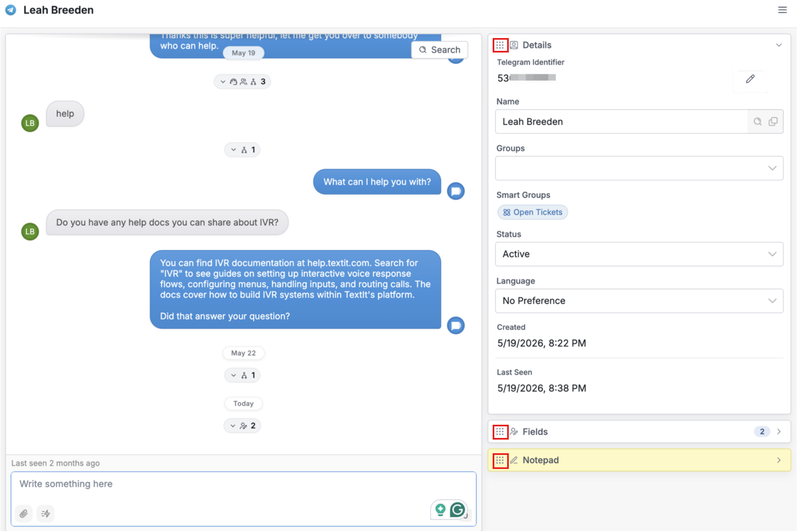
It's your workspace, arranged how you like it!
Edit details right where you are
Everything you might change about a contact lives on the right side of the page: Name, URN, fields, status, language, group membership, and Notes. Click the pen icon, make your edit, and click Save.
The Notepad is your shared space for internal context. It's especially handy for agents: they don't have access to a contact's full profile, but they can read and add notes here, so everyone stays on the same page.
See the whole story at a glance
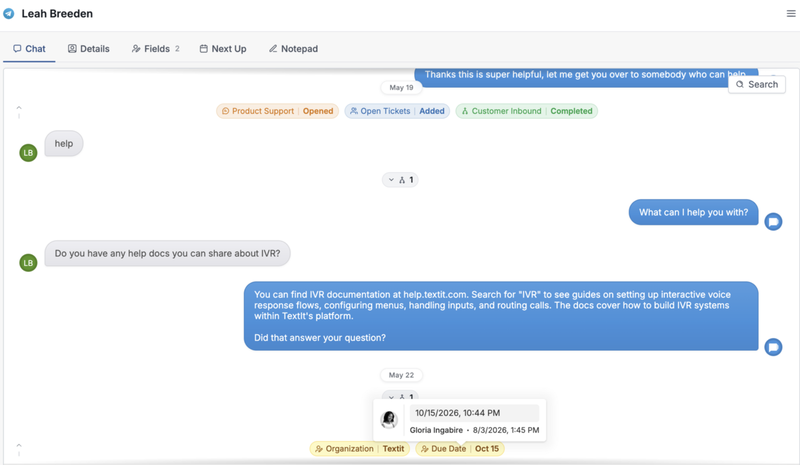
Every meaningful moment, like a flow starting, completing, or getting interrupted, or a ticket opening, is tucked neatly into the pill icons in the chat history. Hover over any manual change to see who made it and when.
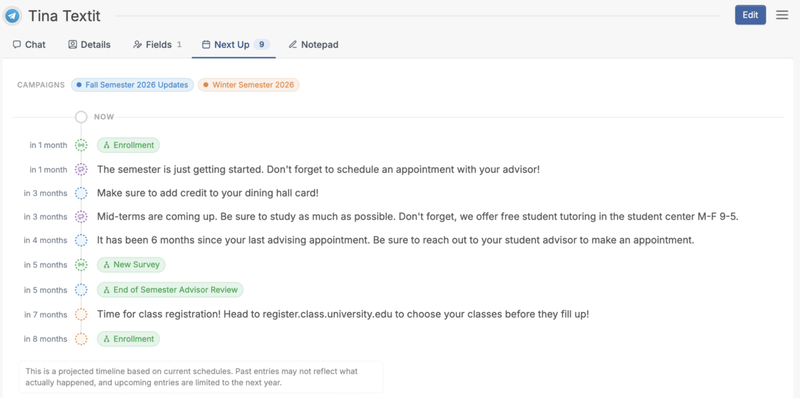
And the Next Up tab shows what's already scheduled for a contact, like a campaign event or broadcast, appearing only when there's something on the calendar.
One page, arranged your way
The new Contact Page is built to save you clicks and needless back and forth. You get the full picture, the tools to act on it, and a layout you can resize and search, all in one place, so you can spend less time hunting for information and more time helping the people on the other end.
More from the blog

Changes Coming to Tickets
We have some exciting new features on the way, but we need to make a couple of small changes to tickets in preparation.

A New Look For Campaigns
Smarter Reminders, Fewer No Shows

Meeting People Where They Are
How Early Alert Uses TextIt to Reach Students & Veterans Before a Crisis